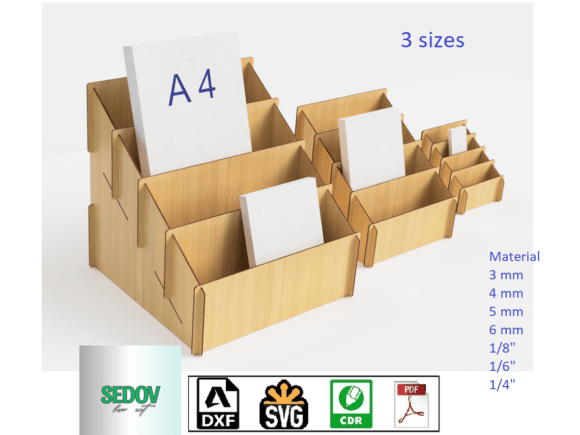
Laser Cut 4 Tier Display Case 3 Sizes – A Smart Choice for Presentation and Storage
Whether you're an entrepreneur looking to display promotional materials or a home organizer in need of a sleek way to manage documents, the Laser Cut 4 Tier Display Case 3 Sizes is a versatile solution that combines functionality with aesthetic appeal. This product is designed to showcase magazines, books, brochures, postcards, and more, while offering customization options that make it ideal for both commercial and personal use. With three sizes available and compatibility with various material thicknesses, this display case can adapt to your needs — but only if you choose and use it correctly.
Understanding the Laser Cut 4 Tier Display Case
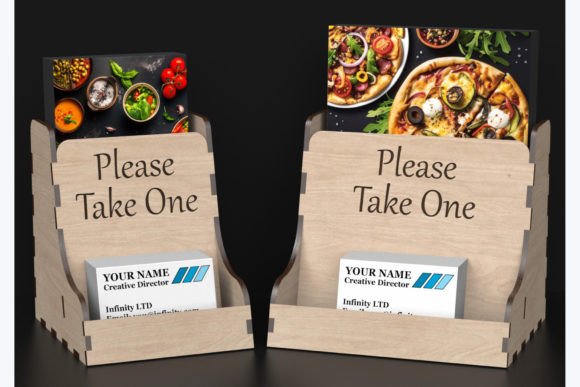
The Laser Cut 4 Tier Display Case 3 Sizes is not just another shelf or storage unit. It's a precisely engineered template designed for laser cutting machines, allowing users to create a professional-grade display from materials like acrylic, wood, MDF, or other sheet-based substrates. The four-tier structure provides ample space for layering items, making it perfect for retail environments, trade shows, offices, or even home use. Its open design ensures visibility, and its stability makes it safe for stacking heavier objects when needed.
One of the key advantages of this product is its adaptability. You’re not limited to a single size or material. Available in three distinct dimensions, it’s suitable for different spaces and purposes. Whether you need something compact for a countertop or large enough for a full magazine rack, there’s a version to match your requirements.
Common Mistakes When Choosing the Laser Cut 4 Tier Display Case
Many users overlook the importance of selecting the right size and material thickness for their intended use. Here are some common pitfalls and how to avoid them:
- Choosing the wrong size: Just because a larger display looks impressive doesn’t mean it’s practical. If you plan to place it on a small table or in a tight retail space, going too big may lead to instability or clutter.
- Ignoring material compatibility: The template is designed for specific material thicknesses (3 mm, 4 mm, 5 mm, 6 mm, and also for 1/4", 1/6", and 1/8"). Using a material outside this range can result in misalignment, weak joints, or structural issues after assembly.
- Not considering weight distribution: While the display case is sturdy, placing heavy items unevenly across the tiers can cause warping or collapse over time.
- Overlooking paintability: Although the raw material might be attractive, many users fail to realize they can customize the look by painting the finished product in any color they desire. Failing to plan for aesthetics upfront can limit its visual impact.
Why Size Matters and How to Choose Right
Selecting the correct size is critical to ensuring usability and effectiveness. For example, if you're using the display at a local bookstore, the smallest size might be sufficient for showcasing new releases or seasonal promotions. But if you're setting up a full-service kiosk for magazines at a convention center, the largest size would be more appropriate to accommodate high volume without overcrowding.
A helpful approach is to measure the space where the display will go and consider what you intend to showcase. Will it hold thick catalogs or thin flyers? Is it for indoor or outdoor use? These questions will guide you toward the best fit. Also, check the included size chart in the product description — it can save you time and money by helping you visualize the scale before purchasing.
Material Thickness: Don’t Assume All Materials Are Equal
When working with laser-cut templates, the material thickness plays a major role in the final product's durability and appearance. The Laser Cut 4 Tier Display Case 3 Sizes is compatible with several standard thicknesses, which is great news for DIYers and professionals alike. However, choosing a material that's too thin could compromise the integrity of the case, especially if you're planning to stack heavier items like hardcover books or promotional boxes.
For instance, if you're crafting the display from 3 mm MDF for a temporary pop-up shop, it may suffice. But for a permanent fixture in a retail store, you should opt for thicker materials such as 6 mm acrylic or wood to ensure long-term stability. Always verify that the file you download includes the correct kerf compensation for your chosen material — otherwise, parts may not align properly during assembly.
Painting and Customization: Enhance Functionality with Style
One of the standout features of the Laser Cut 4 Tier Display Case 3 Sizes is its ability to be painted. This allows you to match the display to your brand colors, interior decor, or event theme. However, a common mistake is underestimating the effort required for proper finishing. Simply spraying paint over the pieces won't always yield a smooth, professional finish — especially if the material has a rough surface or gaps between joints.
Instead, follow these steps for optimal results:
- Clean and sand the material before painting to remove dust and debris.
- Use a primer if necessary, especially with porous materials like MDF or wood.
- Apply paint in thin, even coats for a polished look.
- Allow each coat to dry fully before adding the next.
- Consider sealing the final product to protect against wear and tear.
Download Formats: Know What You Need Before You Buy
The product comes in a zip file containing SVG, DXF, CDR, and PDF formats. Each format serves a different purpose depending on your equipment and software. For example, SVG is commonly used for vector graphics in design programs, while DXF is preferred for CNC and laser cutter machines. Not knowing which file format your machine requires can lead to delays or unusable files.
Before downloading, confirm the type of software your laser cutter uses. If you're unsure, reach out to the seller or consult online forums for advice. Some users also benefit from printing the PDF layout on paper first to test alignment and proportions — this step can prevent costly mistakes when working with expensive materials.
Assembly Tips: Avoid Common Errors
Even with precise laser cuts, improper assembly can affect the overall performance and appearance of the display. One frequent error is skipping the instructions or rushing through the process. This can result in misaligned layers or unstable construction.
To avoid this, take time to review the assembly guidelines thoroughly. Use clamps or weights to keep pieces aligned during glue drying, and work in a clean, flat area to prevent warping. If you're using multiple units, label each part beforehand so you don’t mix up components from different kits. These small precautions can significantly improve the final product's quality and longevity.
Use Cases: Beyond Retail Displays
While the primary use of the Laser Cut 4 Tier Display Case 3 Sizes is for showcasing merchandise, its applications extend far beyond retail. Educators can use it to organize classroom resources, bloggers might display their latest printables or zines, and hobbyists can store tools or craft supplies neatly. In home offices, it can serve as a stylish document organizer or recipe stand.
Entrepreneurs often miss the opportunity to repurpose this display for non-commercial settings. For example, using the smallest size as a kitchen counter display for cookbooks and recipe cards adds both function and charm. Think creatively about how you can integrate the display into your daily life or business operations for maximum value.
Evaluating Cost vs. Quality
It's tempting to focus solely on price when buying laser cut templates. However, the cost of the Laser Cut 4 Tier Display Case 3 Sizes should be weighed against the quality of the design and materials you'll use. A slightly more expensive template with accurate measurements and detailed instructions can save you money in the long run by reducing errors and rework.
Also, consider the cost of materials separately. Thicker materials and premium finishes will add to the budget, but they also enhance durability and visual appeal. Always factor in labor costs if you're assembling the display yourself — a well-designed template with clear instructions can reduce the time spent on assembly, increasing efficiency.
Final Checks Before Proceeding
Before purchasing or using the Laser Cut 4 Tier Display Case 3 Sizes, make sure to do the following:
- Measure your intended placement area accurately.
- Confirm the material thickness supported by your laser cutter.
- Review the included file formats and choose the one that works best for your setup.
- Read through the assembly instructions to understand the process.
- Plan for finishing touches like painting or sealing based on your aesthetic goals.
In conclusion, the Laser Cut 4 Tier Display Case 3 Sizes is a powerful tool for anyone needing a stylish yet practical display solution. By understanding its capabilities and avoiding common missteps, you can unlock its full potential and enjoy a product that enhances both your workspace and your customers' experience.